Why WordPress sliders are slow — and how to check yours
Summary. A slider is one of the easiest ways to make a WordPress page heavy, and the images are only part of it. The rest is a JavaScript dependency you never chose, assets loading on pages that have no slider on them, and a layout that jumps while the page is still loading. Four causes, and a five-minute way to check which of them apply to your site.
Cause 1: jQuery, the dependency you did not choose
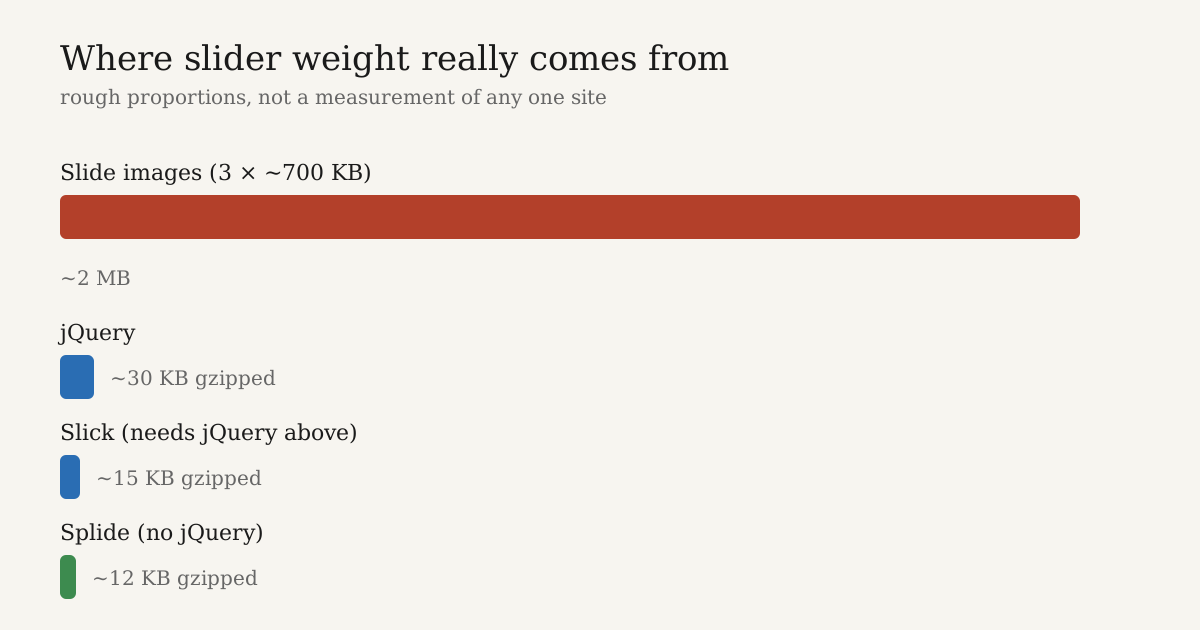
A lot of WordPress slider plugins are built on Slick. Slick is a jQuery plugin, and its own JavaScript is genuinely small — around 15 KB gzipped. jQuery is not. Roughly 30 KB gzipped, about 85 KB before compression.
So the "15 KB slider" is a 45 KB slider. Two thirds of it is a library the slider needs and your page almost certainly does not.
File size is not even the worst part of it. jQuery has to be downloaded, parsed and executed before your slider script is allowed to start. On a mid-range Android phone that parse-and-execute step costs more than the download did, and nobody puts that number in a plugin description.
| Library | Gzipped | Needs jQuery? |
|---|---|---|
| Splide | ~12 KB | No |
| Swiper | ~25–40 KB depending on modules | No |
| Slick | ~15 KB + ~30 KB jQuery | Yes |
Those figures were right when I wrote this, but library versions move. Check them yourself on Bundlephobia rather than trusting a number in a blog post, including this one.
If your theme already loads jQuery for something else, the extra cost is smaller. But "something else already made this mistake" is a poor reason to make it twice.
Cause 2: assets loading on pages with no slider
This is the one I run into most, and it takes ten seconds to check.
Plenty of slider plugins enqueue their CSS and JavaScript on wp_enqueue_scripts with no condition at all. Every page on the site then downloads the slider library — your contact page, your blog posts, your privacy policy. None of which contain a slider.
Go and open your own contact page and search the source for your slider plugin's name. If it is in there, you are paying for a slider on a page that has none, on every single visit.
A well-built plugin registers its assets and enqueues them only when the block, shortcode or widget is actually on the page. This is not difficult to do. It is just easy to skip.
Cause 3: the layout jump
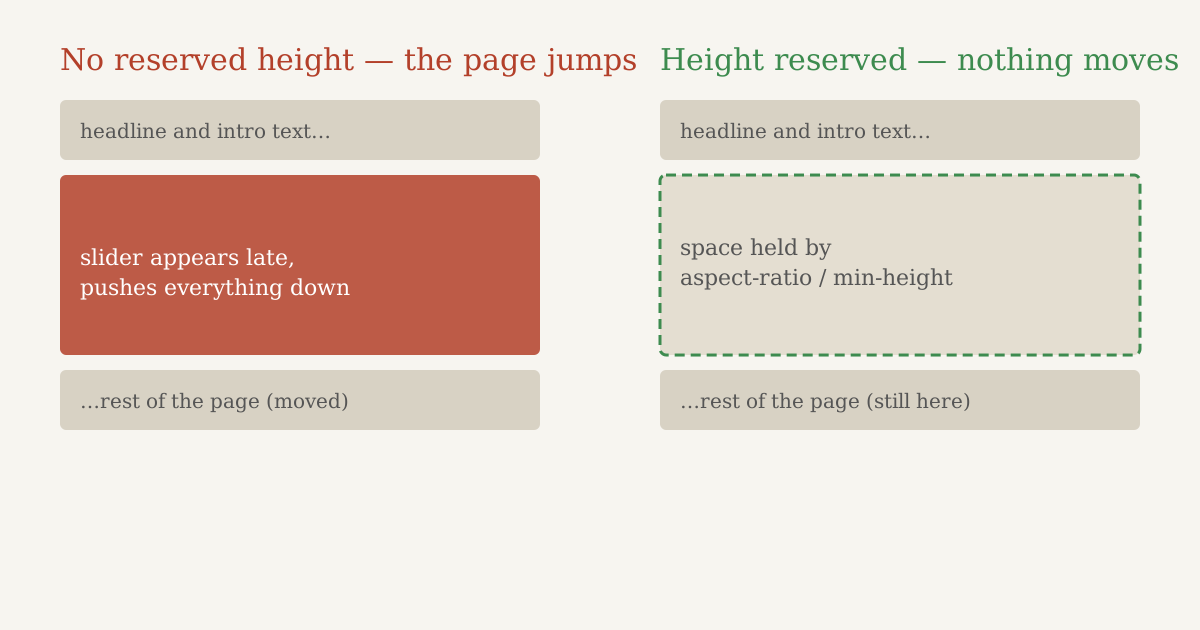
Load a page with a slider on a slow connection and watch it. The text appears, the slider initialises a second later, and everything below it jumps down the page.
That jump is Cumulative Layout Shift, and Google measures it. The threshold is 0.1. One unsized slider can go past that on its own.
The cause is simple enough: the slider container has no height until JavaScript runs and drops the slides into it. So the browser reserves nothing, then has to make room all at once.
The fix is simple too. The container needs a height reserved before the script runs — an aspect-ratio, a min-height, or explicit width and height on the slide images. Whether your plugin bothers to do that is not something any description will tell you. You have to look.
Cause 4: images, the big one
Everything above is measured in tens of kilobytes. Slider images are measured in megabytes. This is where the real weight is, and it is the part people skip past because it is less interesting than arguing about JavaScript.
Three things go wrong, and I see the first one constantly:
- Uploading the full-size photo as a slide. A 3000px JPEG straight off a phone, displayed in a slider that renders at 1200px. The browser downloads every pixel of it and throws most of them away.
- Lazy-loading the first slide. WordPress adds
loading="lazy"to images automatically, which is the right default nearly everywhere — and the wrong one here. The first slide is usually your Largest Contentful Paint element, so lazy-loading it delays the exact thing Google is timing. First slide eager, everything after it lazy. - Loading all ten slides up front. Nine of those downloads happen for a visitor who never clicks the arrow.
How to measure your slider in five minutes
No paid tool, no plugin. All of this is already in Chrome.
Step 1 — find out what is actually loading.
Open a page with your slider. Press F12, go to the Network tab, tick Disable cache, and reload. Sort by Size. You are looking for jquery.min.js, your slider plugin's JS and CSS, and your slide images.
Step 2 — find out how much of it is used.
In DevTools press Ctrl+Shift+P, type Coverage, hit record, then reload. It shows what percentage of each CSS and JS file the page actually ran. Seeing slider CSS come back 70–90% unused is completely normal, and that red bar is more persuasive than any argument you could write.
Step 3 — check a page with no slider.
Load your contact page. In the Network tab, search for your slider plugin's name. Anything that shows up is pure waste.
Step 4 — get the scores.
Run the page through PageSpeed Insights. Look at LCP and CLS, and use the mobile numbers — that is what Google uses for ranking.
Step 5 — watch the jump.
In the Network tab set throttling to Slow 4G, reload, and watch. If the page visibly jumps when the slider appears, you have a CLS problem, whatever the score says.
What good looks like
Google's Core Web Vitals thresholds, on mobile:
| Metric | Good | Poor |
|---|---|---|
| LCP — largest element painted | ≤ 2.5s | > 4.0s |
| CLS — layout shift | ≤ 0.1 | > 0.25 |
| INP — interaction response | ≤ 200ms | > 500ms |
For the slider itself, a reasonable target:
- No jQuery on the front end unless something else genuinely needs it
- Under about 50 KB of slider CSS and JS combined, gzipped
- Zero slider assets on pages without a slider
- No visible jump when the slider initialises
- First slide eager, the rest lazy
What to actually do about it
In rough order of how much you get back for the effort:
- Resize your slide images before uploading. Nothing else on this list comes close. A slide image should be about the width the slider renders at, served as WebP.
- Set the first slide to load eagerly, the rest lazily.
- Check whether assets load site-wide. If they do, and your plugin has no setting for it, that is a plugin problem, not a settings problem.
- Reserve the slider's height in CSS so nothing jumps.
- Then, if it is still heavy, look at whether your slider needs jQuery at all.
Point 5 is last for a reason. Swapping plugins is the most disruptive thing on this list and usually the smallest win. Do the first four, measure again, and there is a fair chance you never get to it.
If you do end up switching, judge the dependency rather than the marketing. Open the plugin in the directory, look at what it actually loads, and run the five-minute test on its demo page.
Disclosure. I build a slider plugin myself — General Slider. I built it on Splide rather than jQuery, and made it load nothing on pages without a slider, because these are the four things that annoyed me about every slider I had used before. I have deliberately kept it out of the comparisons above. Measure your own site and make your own decision.
Common mistakes
- Judging a slider by its own file size and ignoring what it depends on.
- Testing on desktop. Google ranks on mobile. Test on mobile.
- Testing with your cache plugin on. You will measure the cache, not the slider. Test in an incognito window with caching disabled, then again with it on.
- Optimising the library and ignoring the images. 30 KB of JavaScript is not your problem when a slide is 2 MB.
- Lazy-loading the first slide. It is the one image that must not be lazy.
- Assuming a plugin only loads where it is used. Check the contact page. It takes ten seconds.
FAQ
- Do sliders hurt SEO?
- Not directly — Google has no rule against sliders. But they affect Core Web Vitals, and those are a ranking signal. A fast slider is fine; a slow one costs you the same as any other slow element.
- Is jQuery really that bad?
- It is not bad, it is usually unnecessary. Around 30 KB gzipped plus parse time, for something a modern slider library does without it. If your theme already loads jQuery, one more consumer of it costs little extra — the problem is loading it only for the slider.
- How do I know if my slider causes layout shift?
- Throttle to Slow 4G in DevTools and reload while watching the page. If content below the slider jumps down when it appears, that is the shift. PageSpeed Insights will also report it under CLS.
- Should I lazy-load slider images?
- Yes, except the first one. The first slide is usually your LCP element, and lazy-loading it directly delays the metric Google measures.
- What is a reasonable size for a slide image?
- Roughly the width the slider renders at — for a full-width slider, around 1600–1920px is plenty — saved as WebP. A 3000px original downloads two or three times the data for no visible gain.
- My PageSpeed score is fine. Do I still need to care?
- Check the mobile score, not desktop, and check a real page rather than the homepage you optimised. If mobile LCP is under 2.5s and CLS is under 0.1 on your actual slider page, you are fine — go do something more useful.
Conclusion
Sliders get blamed for slow sites, and the slider is rarely the whole story. It is a 30 KB dependency nobody asked for, assets on pages that do not need them, a container with no reserved height, and a 2 MB photo — four separate problems that happen to arrive together.
All four are measurable, and measuring them takes five minutes with tools already sitting on your machine. Do that before you change anything. Otherwise you are guessing, and guessing usually means rebuilding the wrong thing.
Related guides
- How to build a fast, accessible slider in WordPress with General Slider
- How to install Free Widgets For Elementor